Introducing Kent Workflows - a new paradigm for working with agentic loops.
Picture your typical workday with agents:
– “/plan let’s plan out the task” – “Write the plan in Markdown” – “Send the plan for review” – “Implement the plan” – “Call subagents for code review” – “Wrong, it doesn’t work, fix it”
Sound familiar? I’ll explain how I solved this in kent.sh - a free, open-source agent management system I’m building for the community.
Everyone’s dealing with the problem above in their own way - everyone’s experimenting, and processes keep evolving. Some people have insanely complex systems with 25 different types of agents, some use GStack or Paperclip, someone built yet another kanban board for agents, some run ralph cycles, but everyone has a different approach.
I didn’t want to go and build yet another cookie-cutter subagent orchestrator - instead, I went one more level beyond that.
Does this sound familiar - you spent weeks building your insanely elaborate subagent orchestration system, wrote a ton of skills for every possible scenario, and now you’re sitting there asking your agent:
“Hey, it was written in AGENTS.md that every part of the plan needs to be committed - where are the commits?”
“Why wasn’t the code review subagent called after the task was implemented?!”
<Ctrl+C> “Hey! When are we doing the planning phase?!”
LLMs are a non-deterministic system. They can’t keep track of all the complexities of your workflow, they can’t follow strict checklists, and they are trained to get the highest reward with the least effort rather than do the job properly. That’s why standard coding agents will never solve this problem, and you’ll always be stuck babysitting them.
With Kent, instead, with 0 code, you build an automated system that won’t let your agent stray from the workflow at any stage - from idea to prod, once. You can forget about constantly nudging your agents, about ralph cycles, about silently skipped self-check steps. Your agents will automatically review each other’s work and keep going until the result is perfect - all while you’re asleep or spending time with your family.
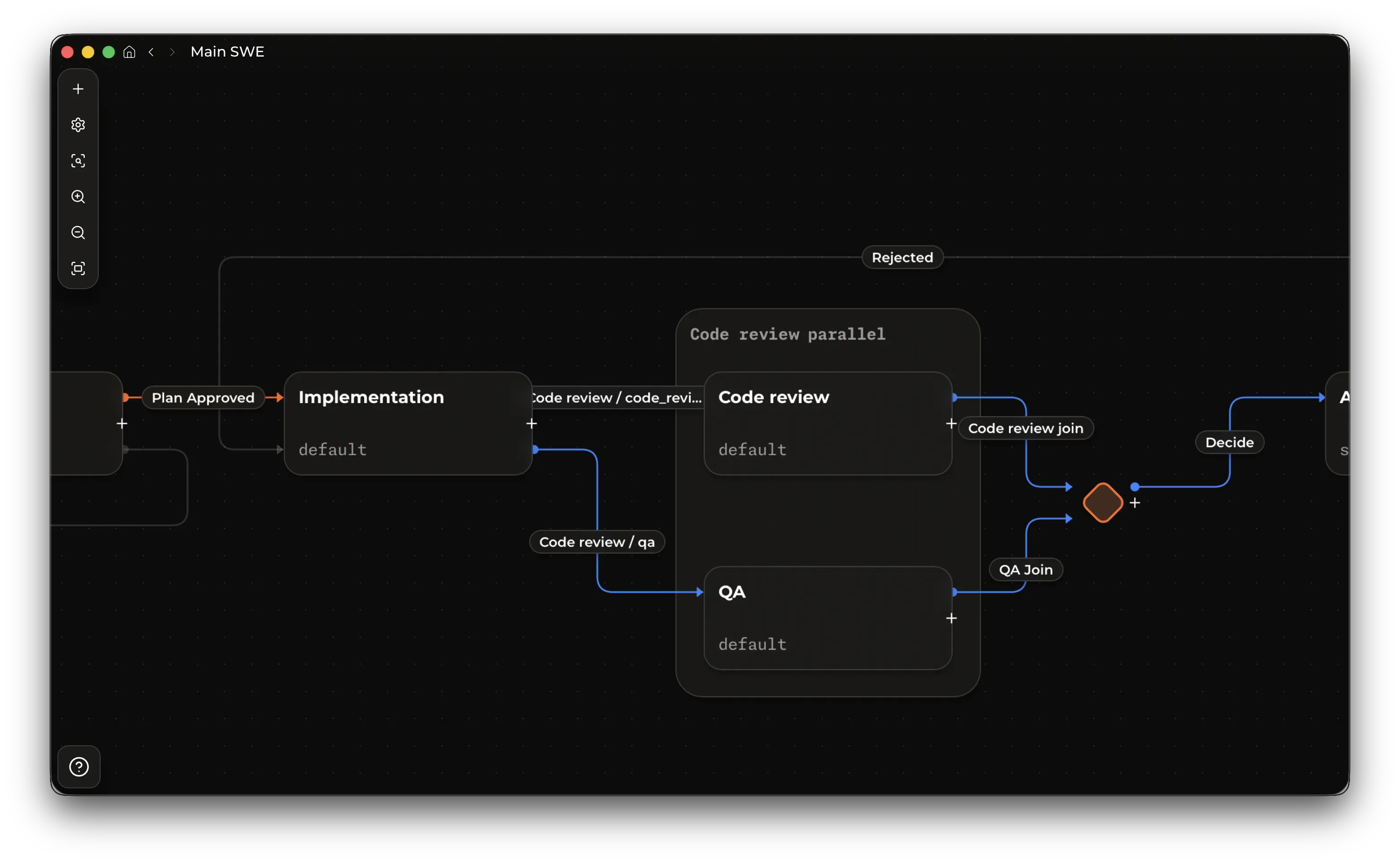
Kent is N8N for agents.
Alongside Workflows in release 2.1.0, I’m ready to show you the Kent desktop app for macOS and Linux. This app lets you leave behind annoying terminals, endless chat input fields, and slash commands. Instead, every workflow you create can be edited both with an agent and manually. And then it turns into a dynamic kanban board that you can always monitor while staying in control. Every agent action can be reviewed either by another agent or manually.
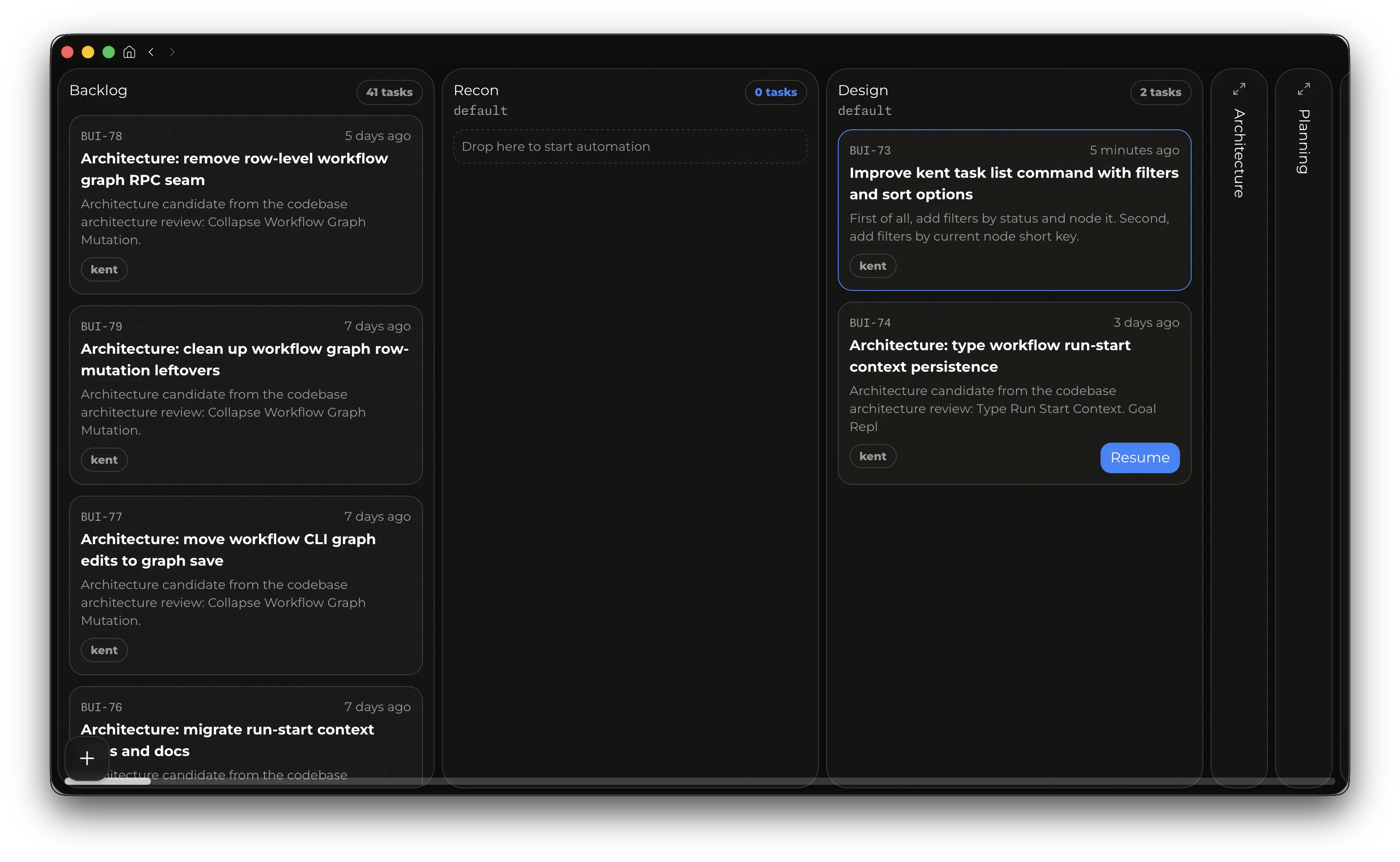
Even though you’re now managing processes asynchronously, agents can still communicate with you. Like colleagues in Slack, agents will ask you questions, clarify requirements, flag blockers, and report on progress - all within the app’s unified interface. So instead of being a babysitter for agents, you become a real product manager, and your only responsibilities now are properly defining tasks and answering questions. You create tasks directly from the Kent Desktop interface (or ask to do it… surprise - Kent himself), after which agents immediately pick up, clarify, implement, self-check, open PRs, go through review, and roll out features to users.
Automate your entire business if you want. Run 16 parallel agents on every commit if you want. Kent is Code Mode of Ralph loops
Under the hood, Workflows run on a powerful CLI that gives your agent all the same capabilities as the desktop app, along with a maximally optimized harness that’s already leading the industry in output quality and token consumption. Everything is built on Kent’s unified harness foundation. I spent months working on the design of this system to minimize the harness’s token consumption as much as possible, eliminate cache misses, and give you the maximum level of flexibility as a foundation for implementing absolutely any ideas you have.
Getting started guide is at kent.sh
Q: So now I have to spend 10 hours migrating my skills and workflows from Claude Code to Kent? A: No. Kent automatically migrates your settings on first launch, and you can trust Kent itself to rebuild your workflow. Just ask it to implement your workflow from any other product.
Q: This burns through tokens like crazy, right? Do you expect me to have 20 agents spinning up for every little thing? A: First of all, thanks to the CLI-first design, caches aren’t invalidated during operation. Second, you’re always in control and can write scripts with agents that make decisions about task complexity and the steps needed - for example, skipping the planning phase for simple tasks. And third, at any point you can continue any previous session instead of starting a new one. Unlike some providers, a workflow in Kent doesn’t spend a single extra token compared to a regular session.
Q: Great, another self-promo slop. How much does it cost? A: All the code is open source, this is completely free, and it already works with your existing OpenAI subscription. If you use ChatGPT - you can use Kent.
Q: Did AI make this? A: Kent built Kent, but this post was written by one a bit too excited human.
P.S. The architecture is stable, but the desktop app is still in beta. The Windows version is coming a bit later, and over the coming days I’ll be cleaning up most of the codebase and adding important missing features, such as script-based nodes and new parallelism modes.